Essay
Adding A Central Autoloader To WordPress
Bolting a Composer-based autoloader onto WordPress Core looks like an all-or-nothing rewrite, but it isn't. Start with an empty PHP 5.2-compatible autoloader, then migrate classes one at a time by deleting their manual require statements — a working proof, plus the edge cases for procedural files and plugin conflicts.
There’s a new WordPress release cycle being started right now for WordPress 4.6, and the core developers have built a wishlist to collect the feature/change requests to consider for this release.
One of the more interesting items on this list is the plan to include a central autoloader within WordPress Core (#36335 - Next generation: core autoloader proposal), which could then be reused by plugins & themes.
I recommended not building a custom autoloader for WordPress, but rather reuse the one provided with Composer. I’d do this by first implementing a very quick version to just enable the autoloader at all, and then incrementally make changes to the existing Core code to make it autoloadable. Once the Composer’s composer.json schema is in place, it is very easy to add classes that are ready to be autoloaded.
I have now made a quick test to see whether that approach is viable. And my conclusion, so far, is that this is probably much easier than people think.
Basic Approach
Most of the discussions I read about adding an autoloader to WordPress make it seem like it would be necessary to do this as one big change that tries to autoload each and every file.
However, this is not necessary at all. Having an autoloader available basically just means that, if you try to access a class, an interface or a trait that has not yet been declared for PHP, it will pass the name of the missing entity to the registered autoloader(s). If they return control to PHP, and the missing entity is still not declared, PHP will throw an error. So, at any moment in time, we need to make sure that each of the PHP constructs that are being used is either known to the registered autoloader OR already loaded through a manual include/require.
The minimum viable autoloader then is an empty autoloader without any class mappings, as long as all the rest of the required classes are loaded manually.
This fact makes it possible to just load an empty autoloader to start, and then gradually make changes that combine the preparation of a class to be autoloaded with its inclusion into the autoloader’s mappings, one class at a time. This lets us just start with something, and then continue to work on improving it until done.
Changing The wp-load.php File
The wp-load.php file is included in both the front-end and the back-end, and is responsible for providing the initial configuration of the site. This is a good place to hook our autoloader into.
<?php
/* [...] */

/** Define ABSPATH as this file's directory */
if ( ! defined( 'ABSPATH' ) ) {
	define( 'ABSPATH', dirname( __FILE__ ) . '/' );
}

error_reporting( E_CORE_ERROR | E_CORE_WARNING | E_COMPILE_ERROR | E_ERROR | E_WARNING | E_PARSE | E_USER_ERROR | E_USER_WARNING | E_RECOVERABLE_ERROR );

// Load the PHP 5.2 compatible autoloader.
if ( ! file_exists( ABSPATH . '/vendor/autoload_52.php' ) ) {
	die( 'Autoloader was not found, aborting.' );
}
require_once( ABSPATH . '/vendor/autoload_52.php' );

/* [...] */
So, before loading wp-config.php, we load our PHP 5.2 compatible autoloader.
Adding Our Classes To Composer's Autoloader
The above change makes our autoloader ready to be used, but it doesn’t know anything about our classes yet.
As a simple way to get started, we just let Composer parse the entire wp-includes/ folder. It will build a classmap that maps each class name to a file within that folder. We can later have this be more nuanced if needed, but for now, this is good enough.
We also add the xrstf/composer-php52 package, which automates generating a PHP 5.2 compatible autoloader, as the default one only works with PHP 5.3.2+.
Here’s what a simple composer.json would look like:
{
  "name": "wordpress/wordpress",
  "description": "WordPress is web software you can use to create a beautiful website or blog.",
  "keywords": [
    "blog",
    "cms"
  ],
  "type": "wordpress-core",
  "homepage": "http://wordpress.org/",
  "license": "GPL-2.0+",
  "authors": [
    {
      "name": "WordPress Community",
      "homepage": "http://wordpress.org/about/"
    }
  ],
  "support": {
    "issues": "http://core.trac.wordpress.org/",
    "forum": "http://wordpress.org/support/",
    "wiki": "http://codex.wordpress.org/",
    "irc": "irc://irc.freenode.net/wordpress",
    "source": "http://core.trac.wordpress.org/browser"
  },
  "require": {
    "xrstf/composer-php52": "1.*"
  },
  "scripts": {
    "post-install-cmd": [
      "xrstf\\Composer52\\Generator::onPostInstallCmd"
    ],
    "post-update-cmd": [
      "xrstf\\Composer52\\Generator::onPostInstallCmd"
    ],
    "post-autoload-dump": [
      "xrstf\\Composer52\\Generator::onPostInstallCmd"
    ]
  },
  "autoload": {
    "classmap": [
      "wp-includes/"
    ]
  }
}
Well, Yes, But...
I know what you’re thinking. That’s exactly zero classes right now loaded through an entire autoloader system… big deal, right?
Well, we do actually have an autoloader that is active for the entire WordPress Core. Let’s try to examine what the implications are…
Doesn't Composer need PHP 5.3.2+?
Yes, it does, if you want to use it to pull in your dependencies. You do this at development time, though. So, just like most of the other development tools, this bumps requirements up. As an example, grunt, the task runner that is used, needs node.js and npm.
However, the development dependencies are different from the dependencies that the system needs at run-time on the production server. Once Composer has done its works during development, we have it generate a PHP 5.2 compatible autoloader, and this autoloader is the only thing we’re using on the production server for now.
That's a huge overhead for not even loading classes through it, isn't it?
Yes, it is, and it would be a waste of resources if that was our end goal.
But we only did this to enable an autoloader that can be used by WordPress Core and all plugins & themes. Once it is available, it is easily reused all over your site, making the small overhead negligible compared to the huge benefits. What’s more, the better our code base gets, the more the autoloader will turn from an overhead into a performance optimization. Less unused code will be loaded, parsed and executed, less memory allocated.
How easy is it to move a class to the autoloader?
That mostly depends on how clean the code of that class already is. Let’s use an easy example to see what the general work would involve.
As an example, I want to have the _WP_Editors class be autoloaded through Composer’s autoloader. To do this, we need to first find out where it is included or required. To find these, we can just search through the code, looking for the file name class-wp-editor: Search Results on GitHub.
Here’s a list of code locations where that class is loaded:
/wp-includes/general-template.php(lines 2846-2847)/wp-admin/includes/deprecated.php(lines 752-753)/wp-admin/includes/ajax-actions.php(line 1494)
For each of these, we will remove the code that checks for the class’ existence, as well as the code that loads it if necessary (meaning we just delete the lines that were highlighted in the links).
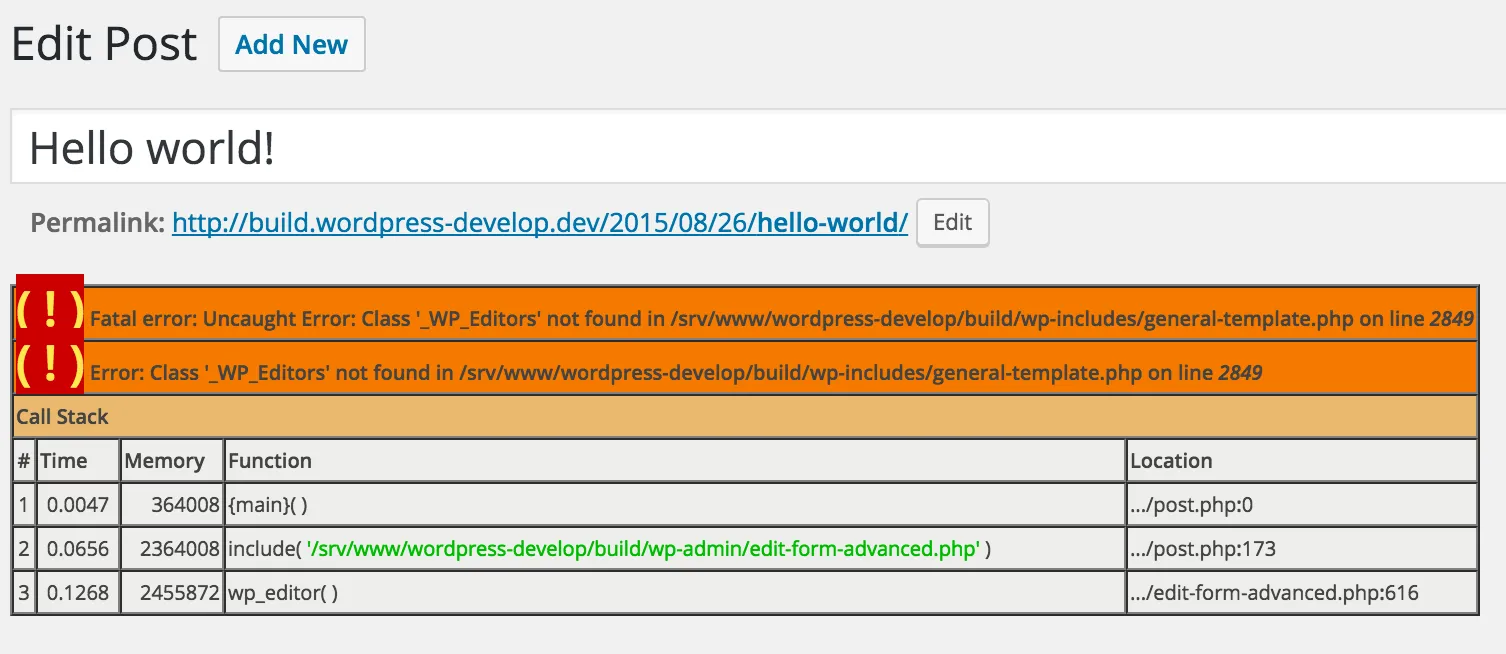
Without the autoloader we’ve discussed above, this will of course break our site as soon as a page request tries to load the _WP_Editors class.
However, when you examine the classmap that Composer has generated, we can see that it also includes the _WP_Editors class:
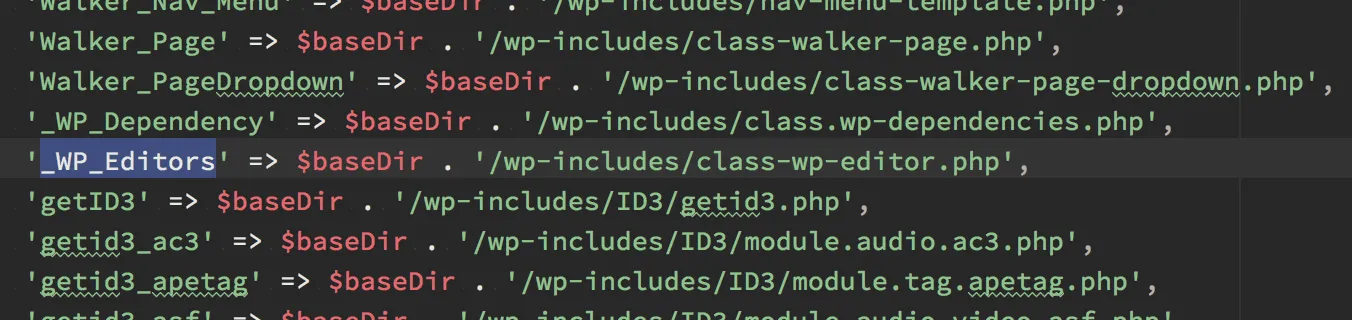
Therefore, when we try the code with our autoloader active (loaded through the wp-load.php file), we don’t get an error message, the editor just pops up as expected.
So, for all well-behaving classes, we can just remove the include/require statements, and it will just work. Best of all: it will even work for plugins & themes.
Great! But what happens when we have a plugin that also includes a composer.json file ?
It depends on how that plugin is installed. If it is installed through one of the normal paths like the “Plugins” screen, or uploading a ZIP file, this plugin’s autoloader will just coexist with the central one we’ve just created. It might cause conflicts if it depends on different versions of the libraries included with WordPress, but that would be bad behaviour in any case.
If however that plugin was installed by adding it as a dependency into our central composer.json, its autoloader would be combined and included within the central one. If there was a version conflict like discussed above, Composer would immediately let us know.
Ok, seems solid. But I'm sure that not all the classes in WordPress can be loaded that way!
True. But this approach allows us to see how far we can get with easy changes, and then we’ll be able to draw an inventory of what needs to change to complete the autoloader project. All the while, we can already use and test the autoloader, and reap some of the benefits.
Hmm... what about the procedural code? There's files full of functions in there...
Yes. Composer provides a mechanism that lets you define a list of “files” that need to be included with the autoloader. This basically just requires every single file that you provide within that list. So, even the files containing only functions or constants can be included.
This is not useful in every case, but with a few small tweaks to the bootstrapping files, any issues can be easily overcome. And, for the overly difficult edge cases, we can still just leave the existing code in place until we find a better solution.
Conclusion
Including an autoloader within WordPress is not an all-or-nothing endeavour. With these simple changes, we have a fully functional autoloader being loaded with WordPress, and we can start refactoring the existing Core code to gradually load more and more classes (and even functions) through the autoloader.
I would love to hear your feedback about this approach, so don’t hesitate to var_dump() your thoughts in my comments section below!